728x90
추후 추가 공부 후 세부 작성예정
intent : A라는 액티비티(화면) -> B라는 액티비티(화면)으로 특정 버튼을 눌렀을때 이동을 한다던지, 화면왔다갔다 하는것이 intent사용한거
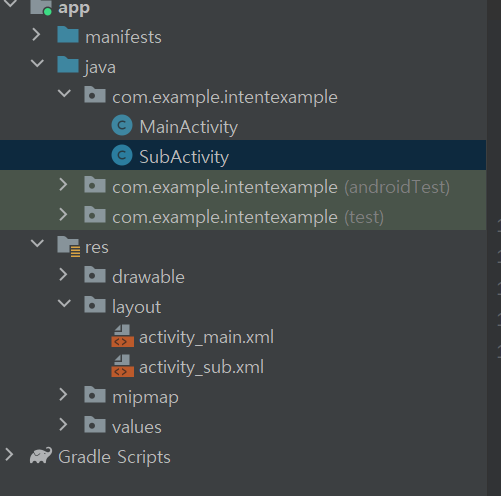
1.이렇게 구성해줘야함(액티비티 2개로!)

main.xml
<?xml version="1.0" encoding="utf-8"?>
<LinearLayout xmlns:android="http://schemas.android.com/apk/res/android"
    xmlns:app="http://schemas.android.com/apk/res-auto"
    xmlns:tools="http://schemas.android.com/tools"
    android:layout_width="match_parent"
    android:layout_height="match_parent"
    tools:context=".MainActivity">


    <EditText
        android:id="@+id/et_test"
        android:layout_width="200dp"
        android:layout_height="wrap_content"/>
    <Button
        android:id="@+id/btn_move"
        android:layout_width="wrap_content"
        android:layout_height="wrap_content"
        android:text="이동"/>
</LinearLayout>main.java
package com.example.intentexample;

import androidx.appcompat.app.AppCompatActivity;

import android.content.Intent;
import android.os.Bundle;
import android.view.View;
import android.widget.Button;
import android.widget.EditText;

public class MainActivity extends AppCompatActivity {


    private Button btn_move;
    private EditText et_test;
    private String str;


    @Override
    protected void onCreate(Bundle savedInstanceState) { //Oncreate:안에있는구문을 쫙실행해라
        super.onCreate(savedInstanceState);
        setContentView(R.layout.activity_main);

        et_test = findViewById(R.id.et_test);
        //str = et_test.getText().toString(); //입력창에 입력한값을 변수에저장,gettext가 스트링형태로 변환

        btn_move = findViewById(R.id.btn_move);//아이디를 찾아와서 btn무브에 저장
        btn_move.setOnClickListener(new View.OnClickListener() {
            @Override
            public void onClick(View v) {
                str = et_test.getText().toString();
                //sub로 가고싶음
                Intent intent = new Intent(MainActivity.this , SubActivity.class);
                intent.putExtra( "str", str);
                startActivity(intent); //액티비티 이동해주는 구문
            }
        });


    }
}sub.xml
<?xml version="1.0" encoding="utf-8"?>
<LinearLayout xmlns:android="http://schemas.android.com/apk/res/android"
    xmlns:app="http://schemas.android.com/apk/res-auto"
    xmlns:tools="http://schemas.android.com/tools"
    android:layout_width="match_parent"
    android:layout_height="match_parent"
    tools:context=".SubActivity">


    <TextView
        android:id="@+id/tv_sub"
        android:layout_width="wrap_content"
        android:layout_height="wrap_content"
        android:textSize="30sp"
        android:text="서브액티비티 도착"/>
</LinearLayout>sub.java
package com.example.intentexample;

import androidx.appcompat.app.AppCompatActivity;

import android.content.Intent;
import android.os.Bundle;
import android.widget.TextView;

public class SubActivity extends AppCompatActivity {

    private TextView tv_sub;

    @Override
    protected void onCreate(Bundle savedInstanceState) {
        super.onCreate(savedInstanceState);
        setContentView(R.layout.activity_sub);

        tv_sub = findViewById(R.id.tv_sub);

        Intent intent = getIntent();//어디선가 intent로 날아오는걸 get으로 받겠다
        String str = intent.getStringExtra( "str");

        tv_sub.setText(str);

    }
}결과


이동한 화면에 입력값 넣었음(전달)
728x90
'✍2021,2022 > app(android studio)' 카테고리의 다른 글
| 앱만들기5.(ListView) (0) | 2021.07.08 |
|---|---|
| 앱만들기 4 (패키지구조) (0) | 2021.07.06 |
| 앱만들기3 (ImaginView &Toast) (0) | 2021.07.05 |
| 앱만들기1 (EditText & Button) (0) | 2021.07.04 |
| 앱만들기0(환경설정) (0) | 2021.07.04 |